Mapping Application Attack Surface
Introduction
What parts of your application are likely to draw the attention of a threat actor? As a general rule, anything that is not nailed down will be stolen… uh, modified. Take a look at forms, headers, cookies, and anything else that a user can modify and send to the server for processing. Let me say that again, anything the user can send to the server for processing.
A good way to identify potential points of interest is to walk your entire application using a web proxy like BurpSuite and comb through the requests looking for fields that you can modify before sending. Not all of these are viable attack surfaces, but it will give you an idea of what is being read by the application. Let’s work through an example step-by-step.
Crawling An Application With BurpSuite
I’m going to assume for the sake of this demo that you don’t have a license for BurpSuite Pro, but I want to call out that Burp Pro has the ‘Crawl and Audit’ feature that can be used to replace a large chunk of the work we’re about to walk through.
Setup
My environment might look a bit different from yours, but that is alright. You’ll need a directory brute-forcing utility (GoBuster or FeroxBuster), an intercept proxy (OWASP ZAP or BurpSuite), and some patience. I recommend you try different tools to get a feel for what your options are. I’ll be using Burp and FeroxBuster because that’s what I’m used to. For the sake of this demo, I’ll be crawling the OWASP Juice Shop.
Objectives
What we are about to do is not a penetration test, vulnerability assessment, or anything of the sort. Our goal is to start putting together a mental model of how our application works. I want to look at some requests and figure out how users are interacting with the server to gain access to the content on my site. Along the way I’ll flag some things as potential issues if there is obvious cause for concern. The workflow is generally as follows:
- Identify Inputs/Outputs
- Forms
- Headers
- Cookies
- Identify Actions Processed Server-Side
- Authentication
- Checkout
- Database Lookups
If you are familiar with application architecture/design or common vulnerabilities and exploits, you can optionally get a jump start on threat modeling for your application:
- Identify Trust Boundaries
- Web UI/API
- Unauthenticated/Authenticated
- File Uploads/File System
- WAF/Application
- Infer Back-End Architecture
- Directory Structure
- Server Technologies
- Integrations
- Identify Likely Abuse Cases
- Credential Stuffing on Login
- SQLi on Product Search
- JWT Attacks on Authentication/Session Tokens
Getting Started
Start up Burp, open it’s built-in browser or one that you have configured to use Burp as a proxy, and navigate to the site you’re testing. In the target tab, right click on the site you’re testing and click “add to scope” in the context menu. When prompted to stop sending out-of-scope items to Burp’s history, select “No”. ![[Pasted image 20260506073521.png]] We do this to track requests to any dependencies like Mapbox for example.
Crawling The Application
To crawl the application, we’ll use FeroxBuster, but we want to proxy traffic through BurpSuite to capture all of the requests. Your FeroxBuster command should look something like this:
feroxbuster --url http://localhost:3000 --proxy localhost:8080 --wordlist /usr/share/seclists/Discovery/Web-Content/<wordlist>While that is running, we can happy path the application. Go through the app the same way a normal user would. Create an account, log in, change some settings, and log out.
Analyzing The Logs
You should have a pretty solid number of requests to work with at this point. We’ll start our work in in Proxy > HTTP History. Filter requests to only show parameterized requests for in-scope items with 2XX or 3XX status codes and responses. ![[Pasted image 20260506080758.png]] Because JuiceShop is designed to be vulnerable to almost anything, there are a lot of requests here. I’m going to highlight a couple that are similar to what I would expect on most other applications to give you an idea of the process I’m going through.
Request Examples
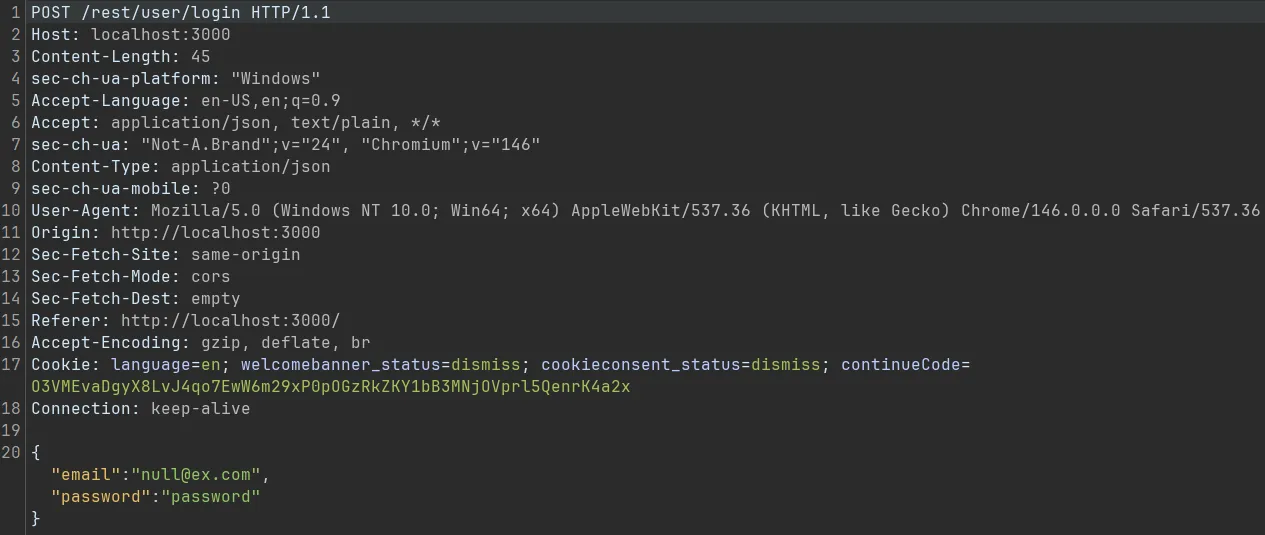
Here we see a pretty normal looking login request. We’re sending a JSON payload to what we can assume is a REST API. We can see the user submits their email and password when authenticating which are always going to be targets for anyone testing the app.
There are a few cookies that seem like they would be processed client-side, and one continueCode that we don’t know what is going on with. We can assume the continueCode is being generated by the server as a session token. There is a pretty good chance this is essentially a basket ID for our current cart. Let’s take a look at another request.
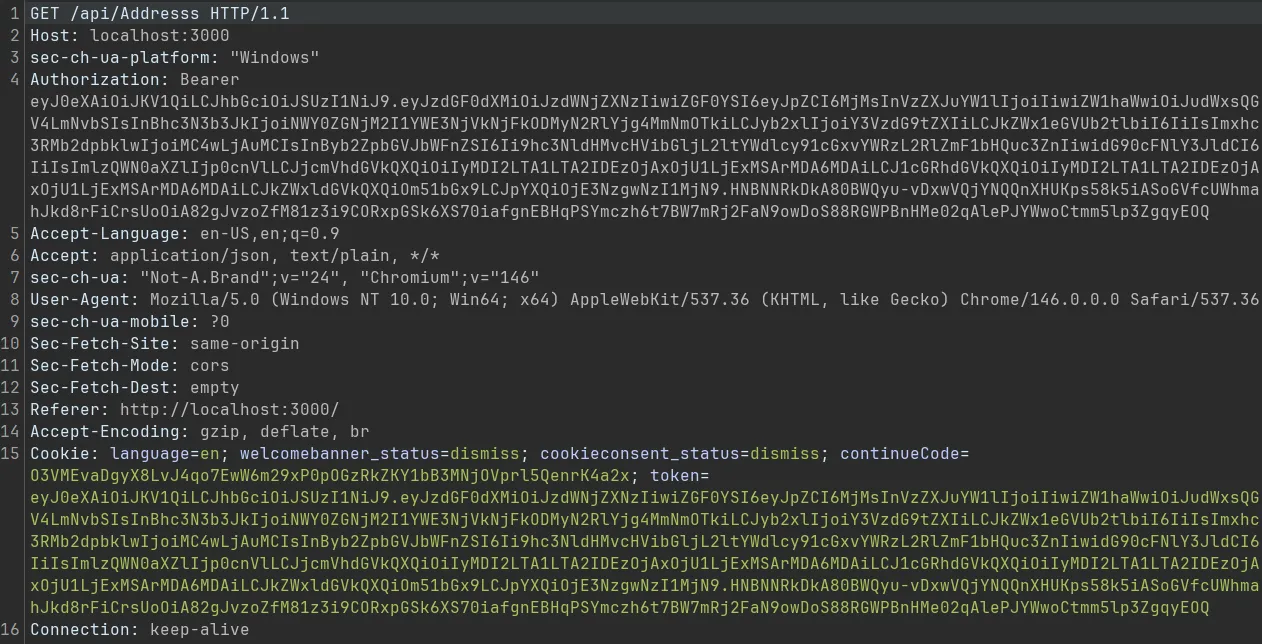
This time we have a GET request to /api/Address. This is most likely a request for user profile information. It is interesting that our authentication token appears in a header and a cookie. That could be an indication that some legacy authentication flow was not properly decommissioned. Let’s look at one final request and then recap.
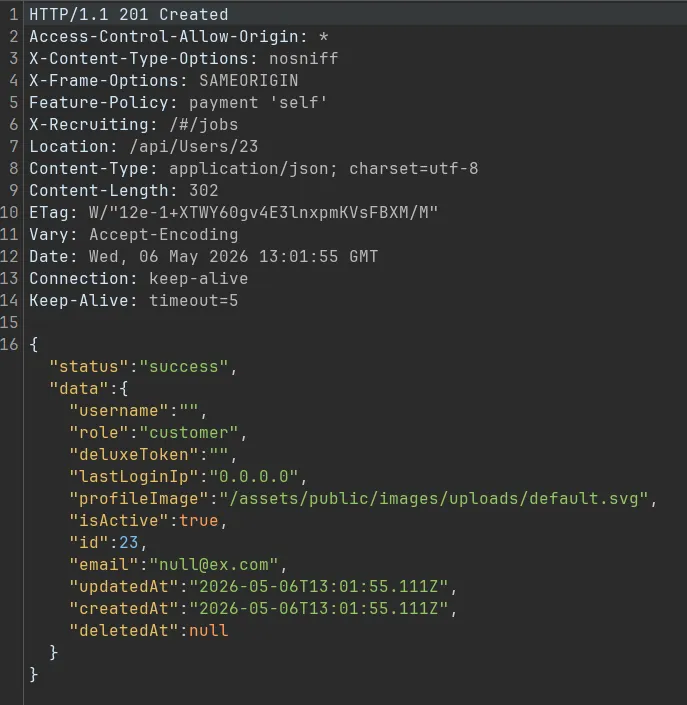
Here we’re looking at a reply to a request from the profile page that highlights one of the things I’m always looking for. We can see the profile image is referenced by name with a full path.
Building A Mental Model
Now that we have seen some requests sent to and replies sent by our app, we should be able to put together a decent mental model of how it is architected. I usually build this as I go, and it’ll look something like this:
- Site uses REST API for authentication
- Mass Assignment
- Credential Stuffing
- Authentication Tokens Are JWTs
- JWT Attacks
- Profile References
/assets/public/images/uploads/- File Upload Vulnerabilities
- IDOR
- Path Traversal
Normally we’ll end up with more notes, but I only looked at two requests and a response for the sake of brevity. We could look at every request/response in a particular flow such as authentication, account creation, or basket creation/checkout. You can also analyze every function within a page such as request/response pairs on
/profile. I prefer the former because it tends to be better for spotting business logic issues, but either approach is valid and has its use case.
No Hacking Required
In my mental model, I always include the types of attacks that I think I might see on an endpoint. This is a product of my penetration testing background and is entirely optional in this workflow. If you aren’t already familiar with the kinds of attacks your application might be vulnerable to, my advice would be to map your attack surface now, and do the attack/vulnerability research later.
Our purpose in mapping the attack surface of the application is not to attack it. We’re looking for things a threat actor might manipulate to attack our application. From there, we can continue down the DAST rabbit hole, start threat hunting with web logs, or start threat modeling. We can also use this as a launch pad to build a risk register later on.
Attack Surface to Attack Pattern Mapping
REST API Attacks
The endpoint /rest/user/login stuck out to me as a potential REST API being used for authentication. The rest directory could have nothing to do with an API, but I’m going to work with that assumption until I confirm otherwise. I know from experience that API based authentication may be vulnerable to credential stuffing if proper server-side protections are not in place.
I also know that mass assignment is a potential issue with any API, especially if it was built using a common API framework. This attack involves sending requests with additional parameters that aren’t intended to be used. For instance, a profile property that determines if an account is publicly visible might be used on the back-end and assigned in the user profile settings; however, I might be able to specify that property when requesting an account by name to make every profile public.
JWT Attacks
I was able to visually confirm the presence of JWTs in the application’s authentication tokens. This is a bit of pattern recognition. JWTs are comprised of three BASE64 encoded strings separated with periods. If you have the ability to take action based on substrings within the JWT, consider building detections based on common JWT attack payloads.
File Upload and Directory Attacks
Based on the presence of uploads in the directory path, we can assume that other uploaded files are going to be stored in that directory. If that is the case, we might be able to get a malicious file on disk and execute it by exploiting a file upload vulnerability.
We also see a lot of information about the directory structure just from that one file path: assets/public/images/uploads/. We can assume assets is either in the root or src directory. This could allow us to find all kinds of interesting files, IDOR vulnerabilities, or maybe even a path traversal. Any time we can clearly identify where we are in a filesystem, the potential for directory based attacks goes up significantly.
Conclusion
Mapping the attack surface of an application is a trivial process that contextualizes almost every other finding or decision regarding that application. An attack surface map can assist in vulnerability prioritization, threat hunting, sprint planning, and almost any other application security workflow. The mental model developed through this process can be expanded into a risk register that cleanly maps and prioritizes work in the background once it is formed. Look to future posts to cover the creation of a risk register, more advanced DAST workflows, and much more.
Recent Posts | Post Archive